API in CAQ.Net
With the CAQ.Net OpenAPI (Application Programming Interface), quality becomes an integrated part of your digital system environment. Whether it’s an MES (Manufacturing Execution System), ERP (Enterprise Resource Planning), smartphone app, or custom front end: functions and data from CAQ.Net can be flexibly integrated into existing applications and used in real time. The open documentation gives you the flexibility to develop your own solutions.
When Systems Talk to Each Other – APIs in Practical Use
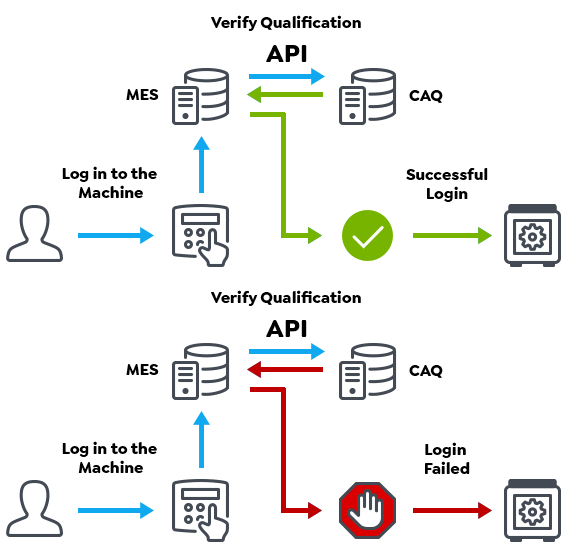
Start up the Machine
An employee wants to set up a machine and authenticates directly at the machine using a chip.
The MES automatically queries the CAQ software via the OpenAPI to determine whether the employee has the required qualifications.
Verify Qualifications for Machine Operation
-
Yes, the employee has the required qualifications and can start up the machine.
- No, the required qualification is not met. The employee is notified accordingly and is not permitted to start up the machine.
Using the same principle, you can also use the OpenAPI to directly check whether relevant documents have been acknowledged.
Verify Acknowledgment of Relevant Documents
- Yes, the document has been acknowledged, and the employee’s work may continue.
- No, the document did not get acknowledged. The employee receives a notification to that effect and can view and acknowledge the required documents directly at the machine without opening the CAQ application.
The machine is connected to the MES, but qualifications are managed in the Training Management Software Qualify.Net, and training documents are managed via the Document Management Software QBD.Net. What happened was that the two systems exchanged data in real time. The MES asked the CAQ via OpenAPI whether the identified employee is authorized to operate the machine, and the CAQ module checked whether the employee had already received the necessary instructions in their most up-to-date version.
Custom Apps or Front Ends
The API can be used to develop custom apps, web applications, or mobile applications that directly access CAQ.Nets functions and data. For example, this allows you to create your own user interfaces for specific processes.
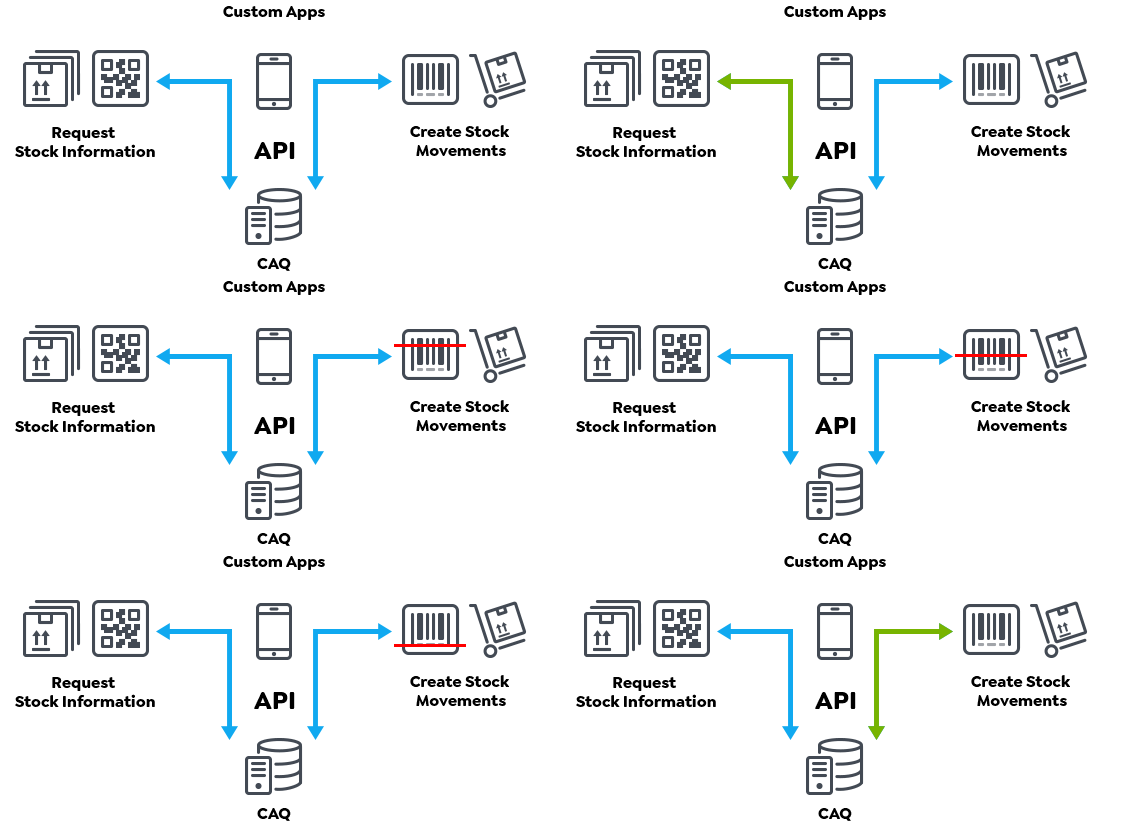
Maintenance and Stock Management
In this example, OpenAPI was used to develop a custom application that can access both the ERP system data and the inventory management functionality of the maintenance management software PMS.Net. Using a tablet, employees can move around the warehouse and carry out various processes directly on site.
For example, when parts are removed from or added to inventory, the corresponding items can be recorded quickly and easily. Information on current stock levels is also available directly within the application – this allows employees to check at any time where a specific item is stored and how many units are available at each storage location.
At a Glance – All Key Stock Information Available
- Article Inventory: Where is a specific article located, and how many units are available at each stock location?
- Stock Location: Which articles and quantities are currently available at a specific stock location?
- Stock Movements: Historical stock movements can be viewed at any time and tracked seamlessly.
Record Stock Movements Directly
- Remove Articles from Stock: Record removed articles directly and update the stock level.
- Add Articles to Stock: Assign new or returned articles to a stock location and book them into stock.
Real-Time Processes – Not Old-School Data Exchange
API interfaces allow data to be exchanged directly and in real time between different systems. Instead of transferring information manually or importing and exporting it with a delay, data is available exactly where and when it is needed. This reduces system discontinuities and the need for duplicate data entry, enabling processes to run automatically across different systems.
The result is faster processes, fewer errors and consistently up-to-date information, even across different applications.
OpenAPI allows CAQ.Net to be integrated into virtually any external system landscape, making almost all CAQ.Net functionality available within an MES, ERP system, or custom smartphone app. Thanks to the open documentation of the API, the necessary front ends or browser-based applications can also be developed independently.
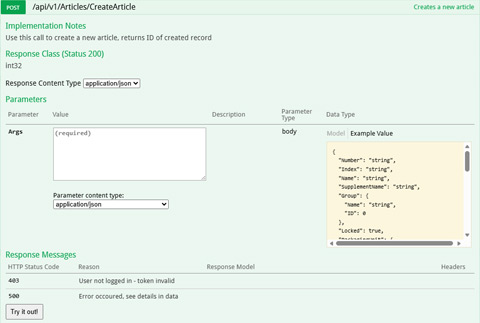 WebAPI Documentation
OpenAPI in CAQ.Net is:
- open
- standardized
- platform-independent and configurable
The OpenAPI Specification (OAS) provides a standardized, machine-readable description of the API. For example, it defines the available endpoints and functions, the data that needs to be provided, and the possible responses.
Based on the OAS, Swagger can then automatically generate easy-to-read API documentation.
What is API Documentation?
Essentially, API documentation is the user manual for an API. It explains to developers how other applications can communicate with the software.
- Which functions are available, e.g. retrieving inspection orders, accessing master data, or transferring results
- What data needs to be provided, e.g. article number, inspection order number, or measured value
- How is a request structured, e.g. which URL or endpoint is used and whether data is retrieved, created, or modified
- What does the response look like, e.g. which data CAQ.Net returns in JSON format
- Authentication and security, e.g. does an external application authenticate itself to the API
- What are the examples and error codes, e.g. sample requests and information explaining what specific error messages mean
Future-Proof
Within CAQ.Net, there is a continuously growing, versioned catalogue of update-proof standard API functions, which is expanded with each release.